
Estimated reading time: 8 minutes
Key Takeaways
- Advanced schema markup drives 20-30% higher click-through rates for service agencies
- Structured data implementation should be treated as infrastructure, not one-off tasks
- JSON-LD format provides the most reliable and scalable implementation method
- FAQ schema significantly improves visibility in AI overviews and search features
- Connected markup systems create stronger entity relationships than isolated implementations
Table of contents
- Introduction
- Why Advanced Schema Markup Matters for Agencies
- Core Schema Types You Should Use
- Service Schema Best Practices
- Implementing Article Schema
- FAQ Schema for AI Overviews
- Strategy Patterns & Architecture
- Implementation Workflow
- Testing and Validation
- Common Pitfalls
- JSON-LD Snippets
- Measuring Success
- Final Checklist
- Agency FAQ
- Final Thoughts
Introduction
Effective schema markup separates competitive service agencies from those struggling to stand out in search results.
This guide focuses on implementing detailed, scalable structured data using JSON-LD to optimize service pages for enhanced search visibility and rich SERP features. For agencies, this means moving beyond basic Organization markup to build an interconnected system that clearly communicates services, expertise, and trust signals.
Recent data from Atak Interactive shows structured data directly impacts agency KPIs like lead quality and client retention. For white-label providers, it becomes even more valuable – a templated solution deployable across client portfolios.
What follows is a tactical roadmap with specific implementation steps, tested JSON-LD templates, and a replicable workflow.
Why Advanced Schema Markup Matters for Agencies
SERP Visibility and Click-Through Rates
Properly implemented schema markup makes agency pages eligible for enhanced features:
- Star ratings and pricing carousels
- FAQ and how-to expansions
- AI overview inclusions
- Expanded sitelinks
These elements collectively drive 20-30% higher CTRs for service pages according to Atak Interactive’s data. The visual prominence attracts clicks from users already in decision mode.
Connecting to Business Outcomes
For agencies, schema implementation maps to measurable results:
- Lead quality: Targeting users through specific service queries
- Retention: Delivering tangible SEO results that justify ongoing engagements
- Scalability: White-label templates allow consistent delivery across clients
Research from Pentame confirms agencies treating markup as infrastructure rather than one-off tasks achieve better long-term organic performance.
Core Schema Types You Should Use
Essential Schemas for Service Businesses
Prioritize these types based on content purpose:
Foundation
- Organization (sitewide)
- WebSite + BreadcrumbList
Service Pages
- Service + Offer + AggregateRating
- LocalBusiness (for multi-location)
Content
- Article/BlogPosting (for blogs/case studies)
- FAQPage (for Q&A sections)
Trust Signals
- Review (verifiable first-party)
- ContactPoint
Implement in layers, starting with Organization, then adding page-specific types. This stacking approach creates coherent markup eligible for the widest range of rich results.
Service Schema Best Practices
Key Properties Explained
Maximize schema.org/Service markup with these strategic implementations:
serviceType
Be precise: “Enterprise WordPress Development” beats generic “Web Development”
provider
Nest full Organization data including:
sameAs(LinkedIn/Twitter)- Verified
contactPoint
areaServed
Link to Wikidata entities for geographic clarity (e.g., Q30 for United States)
offers
Include pricing transparency – even ranges like “Starting at $5,000”
aggregateRating
Only use verifiable, first-party reviews
Implementation Notes
- Always match markup to visible page content
- Version-control templates in your CMS
- For multi-location agencies, link Services to LocalBusiness entities
Nested Provider Example:
"provider": {
  "@type": "Organization",
  "name": "AgencyName",
  "url": "https://agency.com",
  "sameAs": ["https://linkedin.com/company/agency"],
  "contactPoint": {
    "@type": "ContactPoint",
    "email": "contact@agency.com"
  }
}
Implementing Article Schema
Choosing the Right Type
- Article: Evergreen, long-form content
- BlogPosting: Agency blogs, how-to guides
- NewsArticle: Time-sensitive updates
For most agency content, BlogPosting is ideal.
Required Properties
{
  "@context": "https://schema.org",
  "@type": "BlogPosting",
  "headline": "Title (under 110 chars)",
  "image": ["URL (1100px+ wide)"],
  "author": {
    "@type": "Person",
    "name": "Author Name",
    "url": "https://agency.com/author"
  },
  "datePublished": "YYYY-MM-DD",
  "publisher": {
    "@type": "Organization",
    "name": "Agency",
    "logo": "URL"
  }
}
Pro Tip: Link authors to dedicated bio pages with Person schema to strengthen E-E-A-T signals.
FAQ Schema for AI Overviews
Implementation Rules
- Q&As must appear verbatim on the page
- Keep answers concise (40-60 words)
- No duplicate or irrelevant questions
- Maximum 5 FAQs per page
Why It Matters for AI
Search Generative Experience (SGE) systems parse pre-structured FAQ content more reliably than extracting answers from prose. Research from DakotaQ shows high-quality implementations increase appearance likelihood in AI overviews.
Sample JSON-LD
{
  "@context": "https://schema.org",
  "@type": "FAQPage",
  "mainEntity": [{
    "@type": "Question",
    "name": "What is schema markup?",
    "acceptedAnswer": {
      "@type": "Answer",
      "text": "Structured data helping search engines understand page content."
    }
  }]
}
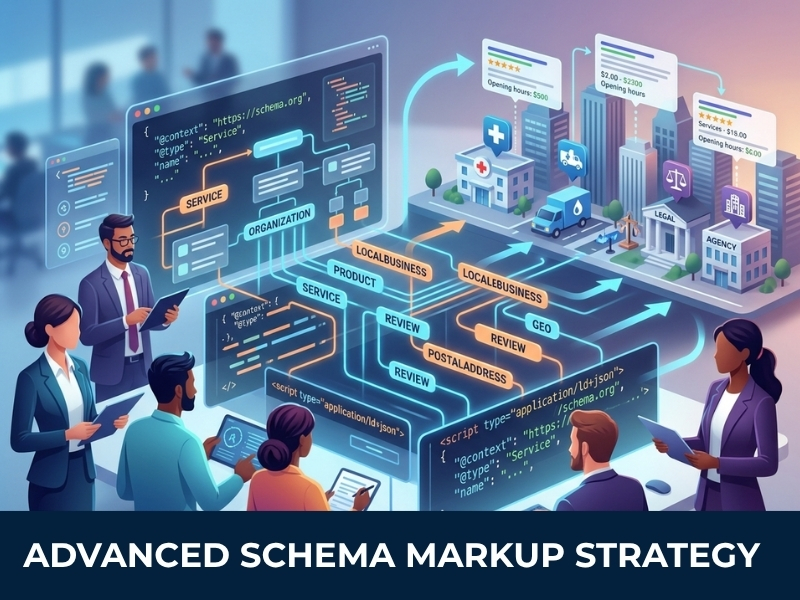
Strategy Patterns & Architecture
Building Connected Markup
Treat schema as an interconnected system:
Organization (Agency)
  └─ Service (Development)
       ├─ Offer (Pricing)
       └─ FAQPage (Q&A)
Use @id references to connect entities without duplication, as outlined in DakotaQ’s entity-based SEO guide:
"provider": {"@id": "https://agency.com/#organization"}Technical Considerations
- WordPress: Use ACF to dynamically populate JSON-LD
- SPAs: Implement server-side rendering for reliability
- Versioning: Track template changes systematically
Implementation Workflow
- Audit existing markup with Screaming Frog automated audits
- Map content types to schema
- Build JSON-LD templates
- Validate in staging
- Test with Google’s tools
- Deploy and monitor Search Console
Critical: Match schema to visible content exactly to avoid penalties.
Testing and Validation
Essential Tools
- Google Rich Results Test
- Schema Markup Validator
- Search Console Enhancements report
- Screaming Frog for sitewide audits
Monitor weekly for errors, particularly after CMS updates.
Common Pitfalls
- Overusing FAQ schema (limit to 3-5/page)
- Marking up non-visible content
- Plugin conflicts causing duplicate markup
- Invalid JSON syntax
- Forgetting to revalidate after updates
Always maintain parity between markup and page content.
JSON-LD Snippets
Service Page Example
{
  "@context": "https://schema.org",
  "@type": "Service",
  "name": "Service Name",
  "offers": {
    "@type": "Offer",
    "priceCurrency": "USD",
    "price": "5000"
  }
}
Combined Page with @graph
{
  "@context": "https://schema.org",
  "@graph": [
    {
      "@type": "Organization",
      "@id": "#organization",
      "name": "Agency"
    },
    {
      "@type": "Service",
      "provider": {"@id": "#organization"}
    }
  ]
}
Measuring Success
Track these metrics:
- Rich result impressions in Search Console
- CTR increases (benchmark 20-30% lift)
- Organic traffic to marked-up pages
- Lead form completions
Final Checklist
Pre-Launch
- Audit existing markup
- Build templates from CMS fields
- Validate all JSON-LD
Ongoing
- Weekly Search Console checks
- Quarterly template reviews
- Documentation of all changes
Agency FAQ
What’s the best schema format for agencies?
JSON-LD, injected in the page head section. It’s the most reliable and easiest to maintain across different CMS platforms.
Does FAQ schema help with AI overviews?
Yes, when answers are visible on the page and provide factual, concise information. AI systems prefer pre-structured content.
How can I verify my schema implementation is working?
Use Google Rich Results Test for individual pages and Search Console’s Enhancements report for sitewide monitoring.
Should I use plugins or custom code for WordPress schema?
Custom code provides more control and avoids plugin conflicts. Use ACF fields to populate JSON-LD templates dynamically.
How often should I update my schema markup?
Review quarterly or whenever you add new services. Monitor Search Console weekly for errors or warnings.
Final Thoughts
Advanced schema markup is a competitive necessity for service agencies. When implemented systematically, it drives better search visibility, richer results, and measurable business outcomes.
The agencies winning with schema treat it as core infrastructure, templated, monitored, and optimized continuously. For white-label providers, it represents a scalable service that delivers consistent value across client portfolios.
Next Steps:
- Audit existing markup
- Prioritize service pages
- Implement, validate, monitor
Ready to operationalize schema across your client base? Start with a comprehensive audit of your current implementation and build from there.